Background
DEIMOS masks can occasionally jam or get cross threaded and someone
needs to manually set things right. There are multiple ways things
can go wrong here. The description below is for the case of cross
threaded masks. Certain other problems may pose a danger so proceed
carefully and consult with the staff astronomer as you go.
Procedure
- Have the staff astronomer move the grabber arm out of the way
(if possible) by hitting the Retrack arm button on
the slitmask monitoring
GUI, which can be launched from the Actions menu on
the DEIMOS instrument control GUI.
- Rotate the instrument remotely to -90° from
the DEIMOS rotator
GUI. Alternatively, use the hand paddle: set the paddle to
manual, elect mode 2, select position 4, and push and release
either the FWD or REV button.
- The slit mask access door should now be on the same side as
the hand paddle (right side when viewing from back of
instrument, looking toward telescope).
- Safety first! Set the band brake.
See figure 1.
- Open the access door with a flat blade screwdriver,
pulling the handle out and pushing door down. Screwdriver
should be on tether beside the handpaddle.
- Figure 2 shows the slit mask
mechanism. Undo the two red knobs (captured) and flip the
little slit mask door down.
- Pause for a moment. Is the grabber arm all the way to
one side allowing any or all masks to be removed? If not, it
could move suddenly. Be careful.
- You should now be able to look down the lengths of the masks
and see if any are cross threaded such that two share the same
slot in the back.
- You may be facing a problem other than a simple cross
thread. Describe what you see to the support astronomer. If
it is a simple cross thread, pull the offending mask out a bit
and try to wiggle it into its correct slot in the back.
- If the grabber arm is stuck somewhere other than all the way
to one side so that masks can be pulled out do not proceed
further without instructions. If an attempt is to be made to
free the grabber arm, instrument air should be released for
safety reasons. See air
pressure reset procedure.
- If for some reason a bent mask is suspected you may be
asked to remove one or more masks and examine them. If so,
the best way to proceed is to look at one mask at a time.
Pull it out, look at it, put it back in its original slot.
- After closing the access panel, release band brake and
return hand paddle to computer mode.
Figure 1. DEIMOS band brake
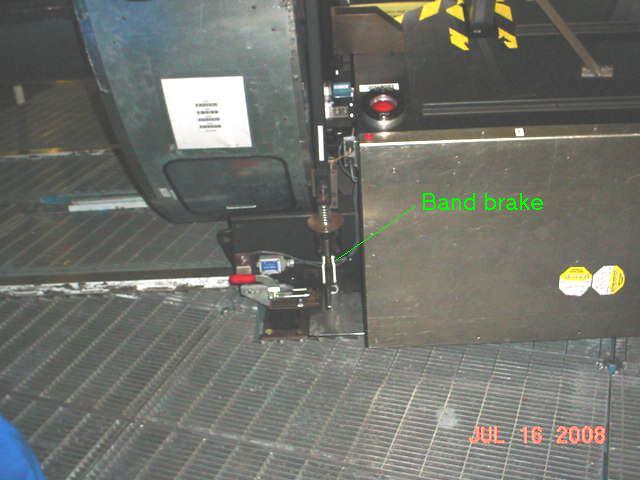
Band brake. Push lever down to engage. Pull up to release.
Figure 2. Slitmask mechanism
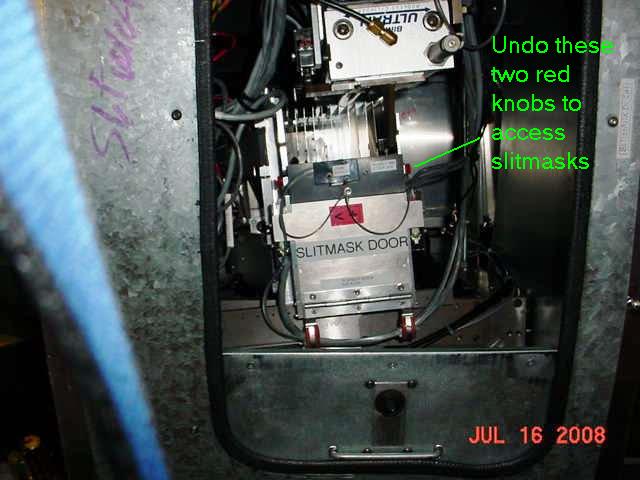
Door to release for slitmask removal.